Site Icon
  • Village Square
    • Newsletter
    • Podcast
    • Coming To Our Senses
    • Blog
    • Village Store
  • Café
  • Library
    • Sensitivity
    • Creativity
    • Culture
  • Fireside
    • Pick The Lock
    • Fireside Spirals
  • Join
  • Sign In
Toggle Side Panel
The Haven
  • Village Square
    • Podcast
    • Zine
    • Blogroll
    • Village Store
  • Café
  • Library
    • Sensitivity
    • Creativity
    • Culture
  • Fireside
    • Pick The Lock
    • Fireside Spirals
  • Join
More options

    Shopping Cart

    No products in the cart.

    Sign in

    Shopping Cart

    No products in the cart.

    • Village Square
      • Newsletter
      • Podcast
      • Coming To Our Senses
      • Blog
      • Village Store
    • Café
    • Library
      • Sensitivity
      • Creativity
      • Culture
    • Fireside
      • Pick The Lock
      • Fireside Spirals
    • Join
    • Sign In
    Close search

    The Haven Information Point

    What are you looking for?

    General Information

    • About The Gentle Rebel Podcast
    • About Notes From a Slow Coach
    • About the zine
    • Suggest a podcast guest

    The Cafe

    • Access The Old Community Gallery
    • Photo or Video Upload Error Message
    • Upload and Share Photos and Videos
    • What You’ll Find in The Community (and why)
    • Find the Activity Feed
    • Post to the Activity Feed
    • Populate your Activity Feed
    • Follow and connect with members
    • About café hashtags
    • Send and receive direct messages
    • Attend live online events
    • Find replays of live gatherings
    • Subscribe to the Events Calendar
    • About the Live Café
    • About the Kota
    • About the Journal Circle
    • About the Phrase Maze
    • About the Book Club
    • New zine watch parties
    • Courtyard events
    • About café ranks

    Manage Your Profile

    • Member Profile Area
    • Add and update profile information
    • Update your profile images
    • Manage your photos
    • Access your saved posts

    The Library

    • Library Components
    • Search The Library
    • Roll the dice in the Library
    • Listen to Andy’s music
    • Access old forum discussions

    The Fireside

    • One-to-one coaching
    • How Pick The Lock sessions work
    • How Fireside Spirals work

    Manage Your Account

    • Access your account settings
    • Problems logging in
    • Reset your password
    • Cancel or pause your membership
    • Update your notification preferences
    • Update your payment information
    • Subscribe to the private podcast feed
    • Data and privacy
    View Categories

    Post to the Activity Feed

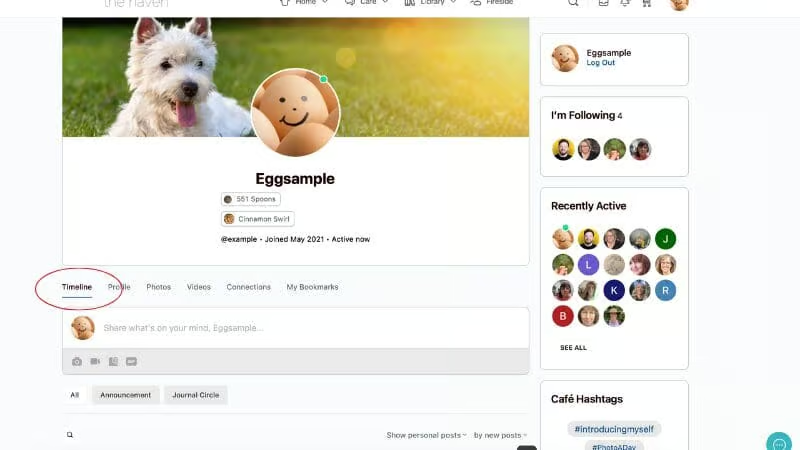
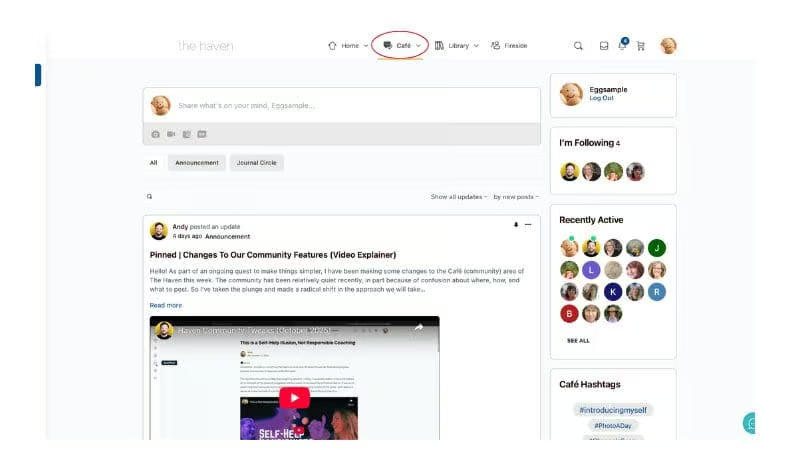
    There are two ways to post to the Activity Feed. Through your Profile Timeline and via the Café Link.

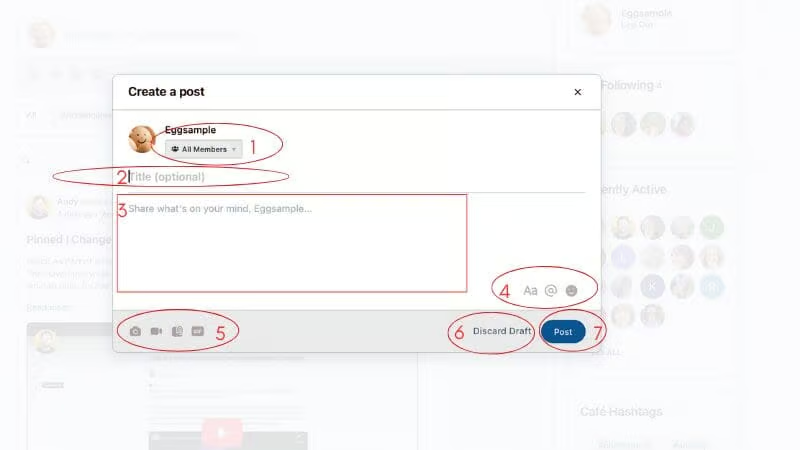
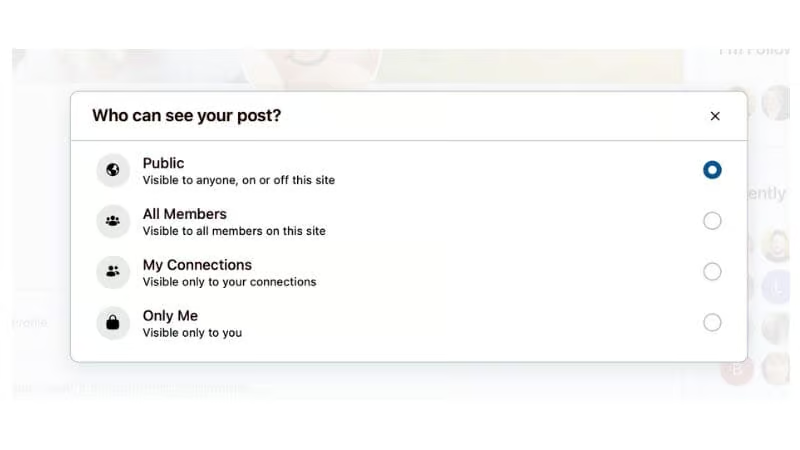
    1. Post Privacy

    You can choose whether you want to share your post with all members, only those you are connected with, or only you (maybe you want to make a note to yourself and consider sharing it with others later). Note that “Public” is not visible to those off the site – all activity feed posts are only visible to Haven members.
    2. Title (optional)

    You can give your post a title. This is not mandatory.

    3. Share what’s on your mind

    There is no character limit to what you post. So whether you want to post a quick update or a long form blog-style post, you can do that here.

    4. Formating, Member-Mentions, and Emojis

    You can add formatting to your post with a range of options to make it visually compelling. You can also mention other members by using their @username and they will be informed you have included them. There are also a host of emojis you can add to your posts.

    5. Attaching Photo, Video, Document, Gif

    You can attach a photo, short video, document, or gif to your post. Photos will be saved in the Photos tab on your profile, and videos will be saved in the Videos tab on your profile.

    6. Discard Draft

    If you close the window before posting your update, you should find it waiting for you when you return. You can hit discard draft to remove it if you change your mind about posting it.

    7. Post

    Don’t forget to hit the “Post” button!

    Hashtags

    Hashtags play an important role if you want to add your post to a community trend or if it shares a subject matter with other posts. For example, if you include #hsp at the end of a post about high sensitivity, it will come up alongside other posts with the same label for those searching.

    Still stuck? Send a message

    How can I help?

    Updated on Mon December 8, 2025
    Find the Activity FeedPopulate your Activity Feed

    Upcoming Events

    Jun 5
    Virtual Event
    5:00 pm BST - 5:30 pm BST

    Journal Circle

    Jun 7
    Virtual Event
    6:00 pm BST - 7:00 pm BST

    Culture Kota 📚📺🍿🎧

    Jun 8
    Virtual Event
    4:00 pm BST - 6:00 pm BST

    Live Café

    View Calendar

    Recent Articles

    • Leave it There

    • Question Prompt: What is something that was unexpectedly left for you to find? And how did you respond?

      Finding Something Unexpected

    • Unable To Drop It

    • Exploiting Trust With Storytelling Frameworks

    • How do you know if you’re…

    See all
    • Join
    • Sign In
    • Blogroll
    • Contact
    • Privacy Policy
    © 2014-2026 Andy Mort | Gentle Rebel Creative

    Report

    There was a problem reporting this post.

    Harassment or bullying behavior
    Contains mature or sensitive content
    Contains misleading or false information
    Contains abusive or derogatory content
    Contains spam, fake content or potential malware

    Block Member?

    Please confirm you want to block this member.

    You will no longer be able to:

    • See blocked member's posts
    • Mention this member in posts
    • Message this member
    • Add this member as a connection

    Please note: This action will also remove this member from your connections and send a report to the site admin. Please allow a few minutes for this process to complete.

    Report

    You have already reported this .